• Skip to main content
  • Skip to primary sidebar

Take 20% off Themes and Services SUBSCRIBE

Docs

Anchored Design

  • HOME
  • DEMO
  • CUSTOM WEBSITE DESIGN
  • LEAVE A REVIEW
  • REQUEST SUPPORT

FSE

FSE – WordPress 5.9 Update

This document last updated on: April 18, 2022

With WordPress 5.9 just around the corner, we know you have questions, concerns. A lot of noise is being made about full-site editing, block-based themes, and the future changes happening with WordPress. We are writing today to help reassure the AnchoredThemes community in light of these changes and inform you of what to expect when updating your WordPress sites.

What is going happen with WordPress 5.9 Release?

  • The major feature in WordPress 5.9 is core supporting full-site editing block-based themes.
  • Other new features include updates to the block editor UI with better controls and a new core navigation block. If you are interested in a complete list and more details, WP Tavern has some good content to browse.
  • The AnchoredThemes will not enable WordPress core’s full-site editing by default.

Quick 5.9 Take away

We recommend waiting a few days after 5.9 is released before you choose to update your WordPress site. This is not a security release, so there is no need to rush to install it. Give some time for potential bugs and conflicts to be found and fixed before you update your production sites. If you are using a staging server to test updates, we recommend performing updates there first to determine WordPress 5.9’s impact on your site in a non-production environment.

Full-site editing in its current phase is a minimum viable product (MVP). We do not recommend that you switch to using it for production sites. Unless you are wanting to experiment for fun, We don’t suggest anyone with a complex site use full-site editing upon the initial WordPress 5.9 release. Currently, the promise of editing anything on your site is limited by the available tools and options. This means that most complex things are still not possible in full-site editing simply because complex tools/features have not been created/implemented in blocks yet. Also, most plugins that use custom post types don’t support it yet (e.g., WooCommerce). The plugins will function properly, however, they won’t be giving you any extra control.

What is full-site editing?

Full-site editing is the next stage in Gutenberg development towards Gutenberg being the entire editing experience in WordPress. It allows you to build all the parts of your site with the Gutenberg editor, if your theme enables this functionality. Headers, navigation, archives, post templates are all editable portions of a WordPress page and anything can be edited. However, while anything can be edited, it doesn’t necessarily mean anything can be done. You are limited by what available blocks you have and those block features/settings.

This is note for customers bought AnchoredThemes from Studiopress and Only on some release of Coaching Plus + Recipe Blogger theme FSE will be enabled by default as we given FSE templates with Theme on Root Folder.

Your site looks wonky ? You see data from Coaching Plus or Recipe Blogger default templates?

What to do now?

  • As we don’t recommend FSE right now please delete folder “block-templates” + “block-template-parts” from root of theme
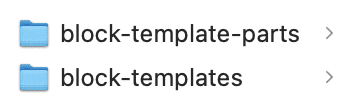
  • If you want to use FSE in near future, please move folders to another Folder under “FSE” or just rename those folders

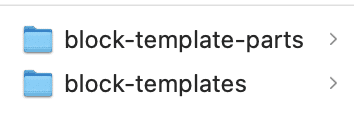
You dont see anything udpated thats really good means you don’t have FSE ON by default because on latest releases of any AnchoredThemes FSE templates are under “FSE” folder only.

But You want to use FSE features somehow? Then Move “block-templates” and “block-template-parts” out of FSE folder and place at root of theme and now your THEME is FSE. Now you need to update templates to your branding and colors again so please do this on staging first and once you are happy with staging, move to production site.

NOTE: We do not recommend it right now to use FSE version of templates as FSE itself and templates both are not mature enough. We will release fully supported FSE once we also gain confidence on FSE.

Here are some guides can be refered to understand FSE editing

WordPress Gutenberg Full Site Editing (FSE) – A beginners guide

Full-Site-Editing – the Ultimate Resource List – Gutenberg Times

Primary Sidebar

Search Documentation

Choose a Main Topic

Installation

  • Installing Theme
  • One Click Theme Setup
  • Additional Resources
  • Demo Posts Install

Customizer Settings

  • Blog and Archive Settings
  • Footer Copyright
  • Logo / Site Title
  • Site Layout Extra
  • Theme Typography
  • Singular Content
  • Theme Colors
  • Image Sizes

Block Pages Guide

  • About Page Guide
  • Contact Page Guide
  • Homepage Blocks Guide
  • Landing Page Guide
  • Other Block Pages
  • Recipe Index Blocks Guide

Widget Areas

  • Footer Widget Settings
  • Header Settings
  • Sidebar Settings
  • Top Bar/Before Header Widgets
  • Mobile Sidebar Content

Additional Guide

  • Page/Post with or without sidebar

Installation

  • Installing Theme
  • One Click Theme Setup
  • Demo Posts Install
  • Additional Resources

Customizer Settings

  • Site Layout Extra
  • Blog and Archive Settings
  • Footer Copyright
  • Logo / Site Title
  • Singular Content
  • Theme Colors
  • Theme Typography

Widget Areas

  • Header Settings
  • Footer Widget Settings
  • After Entry Widgets
  • Top Bar/Before Header Widgets
  • Mobile Sidebar Content

Block Pages Guide

  • About Page Guide
  • Homepage Blocks Guide
  • Work With Me Page Guide
  • Contact Page Guide
  • Other Block Pages
  • Landing Page Guide

Additional Guide

  • Blog/Archive Page Guide
  • Regenerate Thumbnails
  • Page/Post with or without sidebar

Installation

  • Installing Theme
  • Demo Posts Install
  • One Click Theme Setup
  • Additional Resources

Customizer Settings

  • Logo / Site Title
  • Theme Colors
  • Theme Typography
  • Blog and Archive Settings
  • Singular Content
  • Footer Copyright
  • Site Layout Extra

Widget Areas

  • Header Settings
  • After Entry Widgets
  • Footer Widget Settings
  • Sidebar Settings

Block Pages Guide

  • About Page Guide
  • Contact Page Guide
  • Landing Page Guide
  • Homepage Guide
  • Other Block Pages

Additional Guide

  • Author Box Guide
  • Regenerate Thumbnails
  • Page/Post with or without sidebar

Installation

  • Installing Theme
  • One Click Theme Setup
  • Additional Resources

Customizer Settings

  • Footer Copyright
  • Theme Typography
  • Theme Colors
  • Logo / Site Title
  • Header Settings

Widget Areas

  • Footer Widget Settings
  • Header Settings

Block Pages Guide

  • Homepage Guide
  • Other Block Pages
  • Page/Post with or without sidebar

Additional Guide

  • Menu Updates

Installation

  • Installing Theme
  • One Click Theme Setup

Customizer Settings

  • Footer Copyright
  • Theme Typography
  • Theme Colors
  • Logo / Site Title
  • Site Layout Extra
  • Singular Content
  • Blog and Archive Settings

Widget Areas

  • After Entry Widgets
  • Footer Widget Settings
  • Some Widget Areas Settings

Block Pages Guide

  • Homepage Guide
  • About Page Guide
  • Contact Page Guide
  • Other Block Pages
  • Landing Page Guide

Additional Guide

  • Regenerate Thumbnails
  • Page/Post with or without sidebar

Updates

  • Articles coming soon
Articles coming soon

Installation

  • Additional Resources
  • Theme Installation
  • Demo Install

Block Page Guide

  • About Page Guide
  • Homepage Guide
  • Work with Me Guide
  • Landing Page Guide
  • Life Coaching Page Guide
  • Health Coaching Page Guide
  • Instagram Page
  • Contact Page

Customizer

  • Theme Color
  • Theme Typography
  • Page/Post settings
  • Header
  • Footer
  • Archive settings
  • General (Theme Default) settings

Widgets

  • Widgets

Installation

  • Theme Installation
  • Demo Install

Customizer Settings

  • Archive settings
  • Theme Typography
  • Page/Post settings
  • General (Theme Default) settings
  • Theme Color

Widgets

  • Widgets

Block Page Guide

  • Homepage Guide
  • About Page Guide
Popular Articles
  • Blog/Archive Page Guide
  • Demo Posts Install
  • Homepage Guide
  • Header Settings
  • Author Box Guide
Newest Articles
  • One Click Theme Setup
  • One Click Theme Setup
  • One Click Theme Setup
  • One Click Theme Setup
  • One Click Theme Setup
Recently Updated Articles
  • One Click Theme Setup
  • One Click Theme Setup
  • One Click Theme Setup
  • One Click Theme Setup
  • One Click Theme Setup
FAQs coming soon

Copyright © 2026 · Anchored Design Themes · WordPress · Log in